Run your service business from your pocket.
Scheduling, client management, invoicing, and SMS automation — for solo operators and small crews who'd rather be working than wrestling spreadsheets. Available in English, Spanish, and French.


Every trade comes with its own checkmark presets and service types. Two examples:
Cleaning
- 🔑Has Key
- 🚨Has Alarm Code
- 🔒Has Gate Code
- 🐕Has Pets
- 🧴Supplies Provided
- 🅿️Parking Instructions
- ⭐Preferred Products
- 💰Payment Received
- 🧼Standard Cleaning
- ✨Deep Cleaning
- 📦Move-In/Out Cleaning
Catering
- 📋Menu Confirmed
- 💰Deposit Received
- 💸Final Payment Received
- 👥Headcount Confirmed
- 🥗Dietary Restrictions Noted
- 🚐Delivery Address Confirmed
- 🎤Service Style Set
- ❄️Refrigeration On-Site
- 🍴Menu Tasting
- 🚚Drop-Off Catering
- 🥂Full-Service Catering
- 🥘Buffet Setup
Everything you need. Nothing you don't.
Each tool is shaped around how field-service work actually happens — on the road, between jobs, often with one hand.
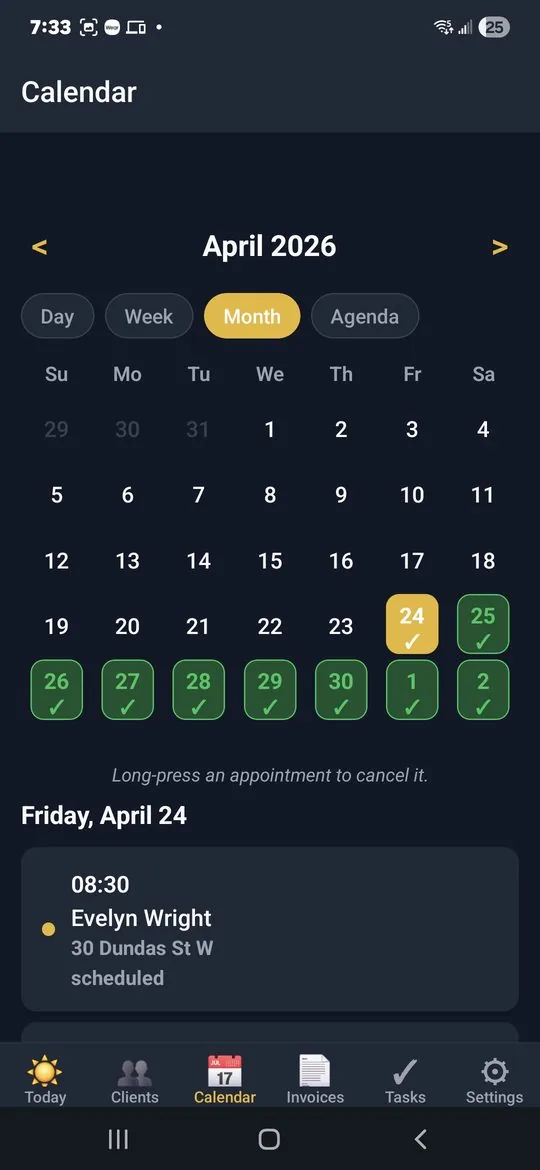
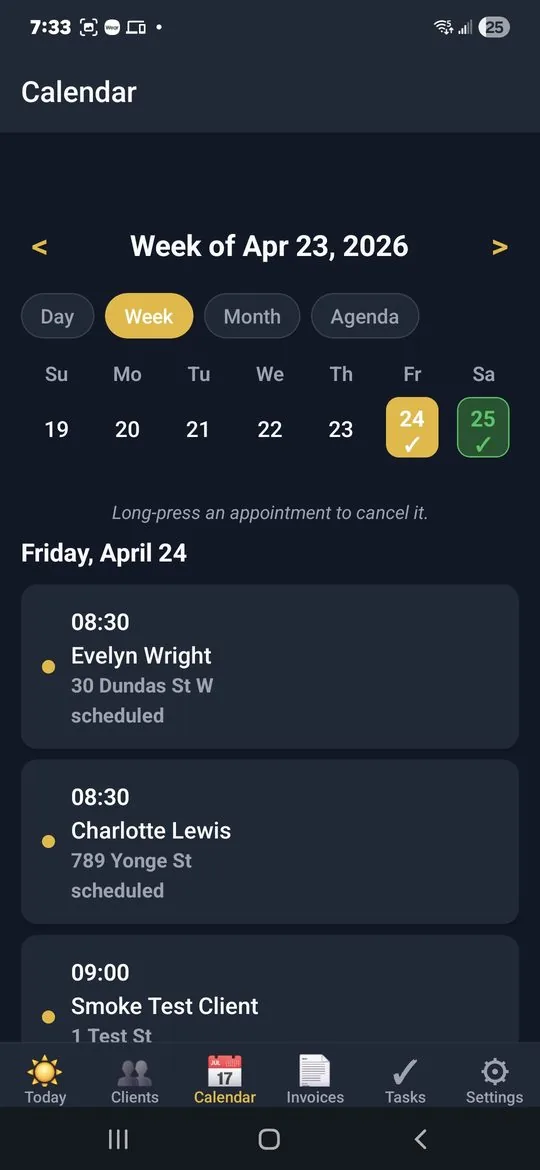
A calendar that thinks like you do
Switch between Day, Week, Month, and Agenda views in one tap. Long-press to cancel. Tap a day to see what's lined up and what got done.
- Four views, instant switch
- Color-coded by status — completed, scheduled, cancelled
- Long-press to cancel an appointment without leaving the screen
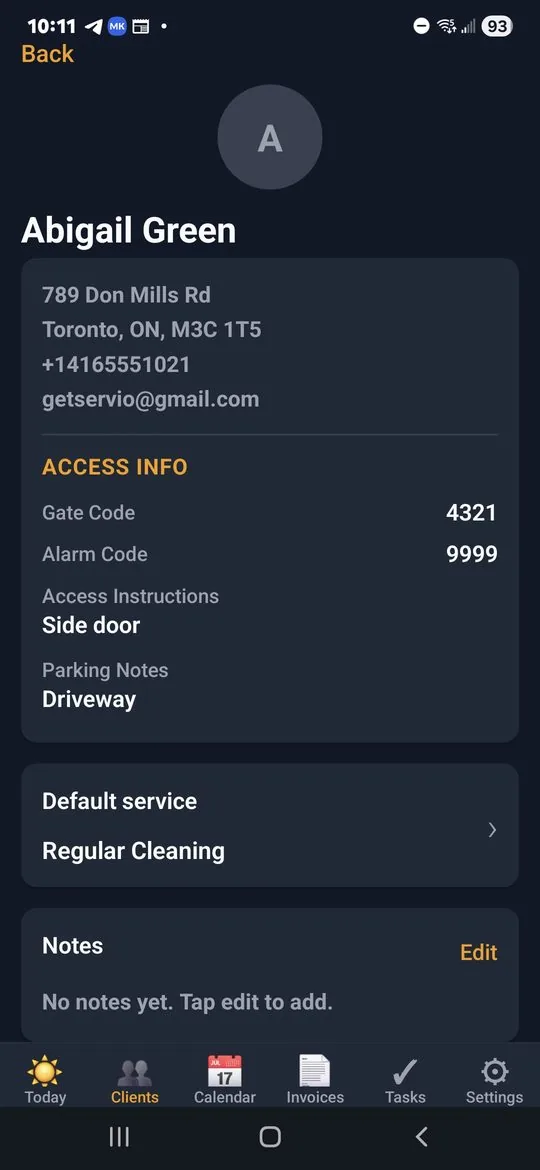
Client cards that remember the details
Gate codes, alarm codes, parking notes, default service, recurring schedule — all on one screen. Stop digging through old text messages five minutes before a job.
- 1-tap to call, SMS, email, or open the address in Maps
- Access info kept private and encrypted
- Per-client checkmarks (Has Pets, VIP, Supplies Provided…)
- Recurring schedules: weekly, biweekly, monthly, custom
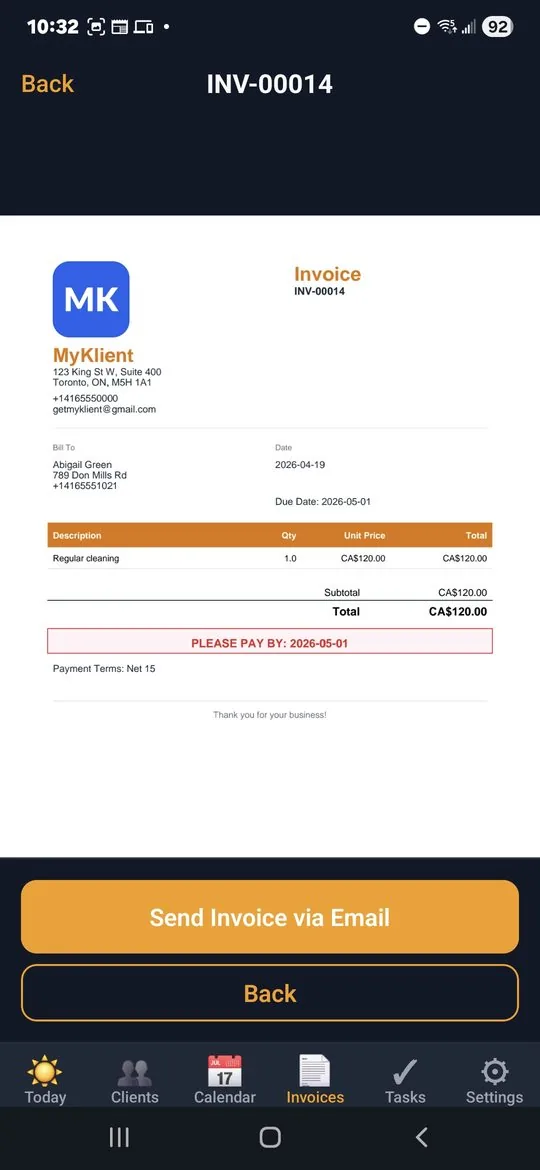
Invoices and receipts — with your own logo, sent in seconds
Generate a clean, branded PDF with your logo and business details at the top. Preview it in-app with pinch-zoom, then send it by email or share-sheet. When the client pays, send the receipt the same way.
- Your business logo and address printed on every PDF
- In-app PDF preview — no external viewer needed
- One-tap send: email or any share target
- Auto-tracked balance due, paid amount, and due date
- "Please pay by" callout and configurable payment terms (Net 7 / 15 / 30, due on receipt)
Know your numbers. Without a spreadsheet.
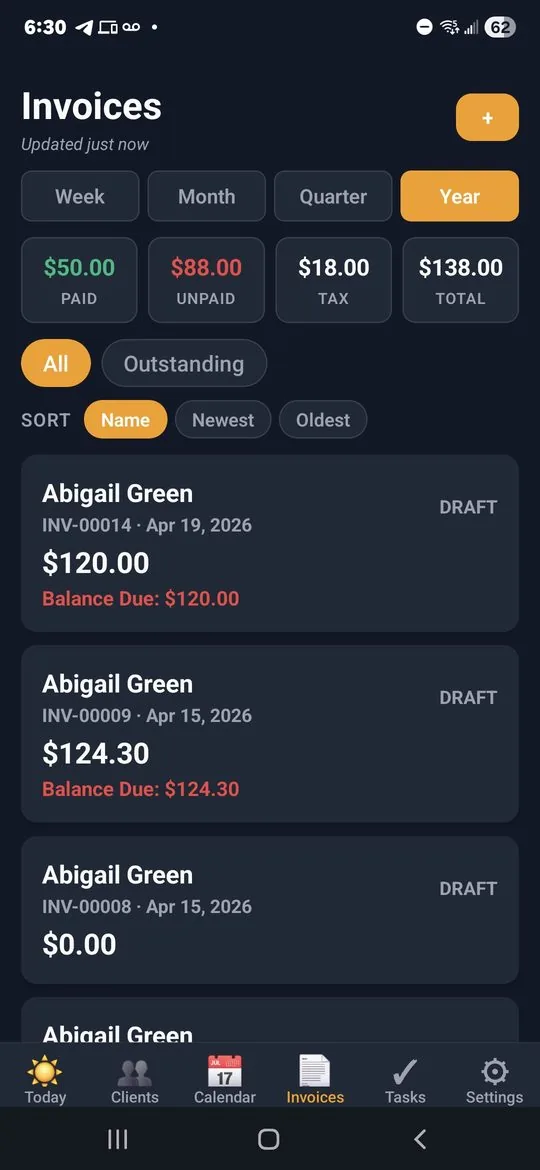
Tap Week, Month, Quarter, or Year — and the four numbers you actually care about update instantly: how much you got paid, how much is still outstanding, the tax you've collected, and your total invoiced. Right at the top of the Invoices screen.
- Paid totals reflect actual cash collected — partial payments included correctly
- Period boundaries respect your time zone (set once in Business Profile, applied everywhere)
- Calendar-aligned: Mon-Sun weeks, Q1 Jan-Mar, current period to date
- Tap the period to also filter the invoice list below — see exactly what made up the totals
Automation that texts your clients for you
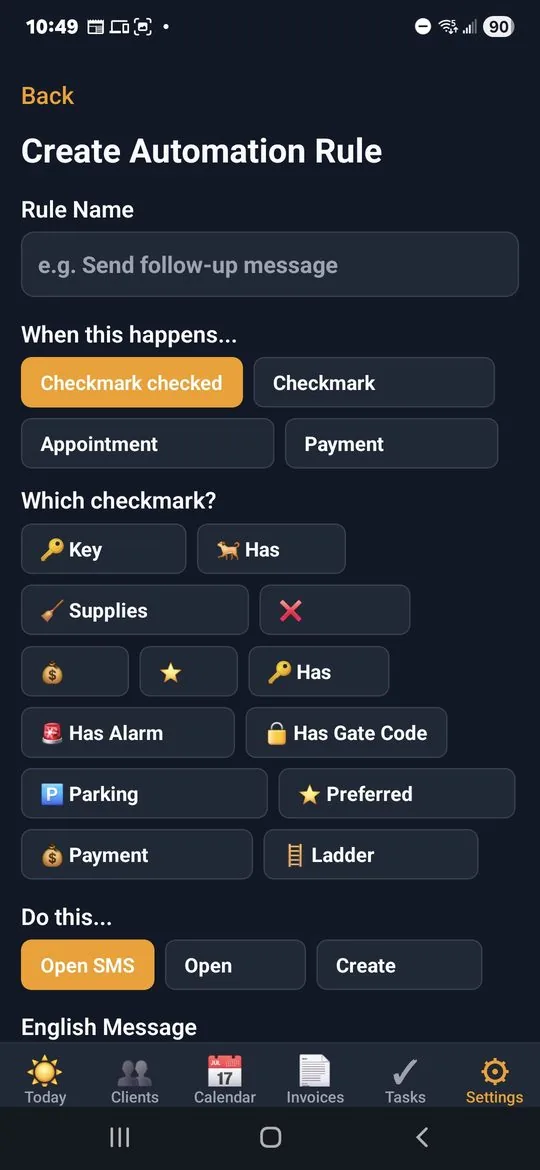
Tick a checkmark, send a templated SMS. Reminders, follow-ups, payment thanks — all in your client's language, with their first name already filled in.
- Triggers: checkmark toggled, appointment scheduled, payment received
- Bilingual templates — English and Spanish in one rule
- Tokens for first name, date, time, amount, business name
"On the way." Sent.
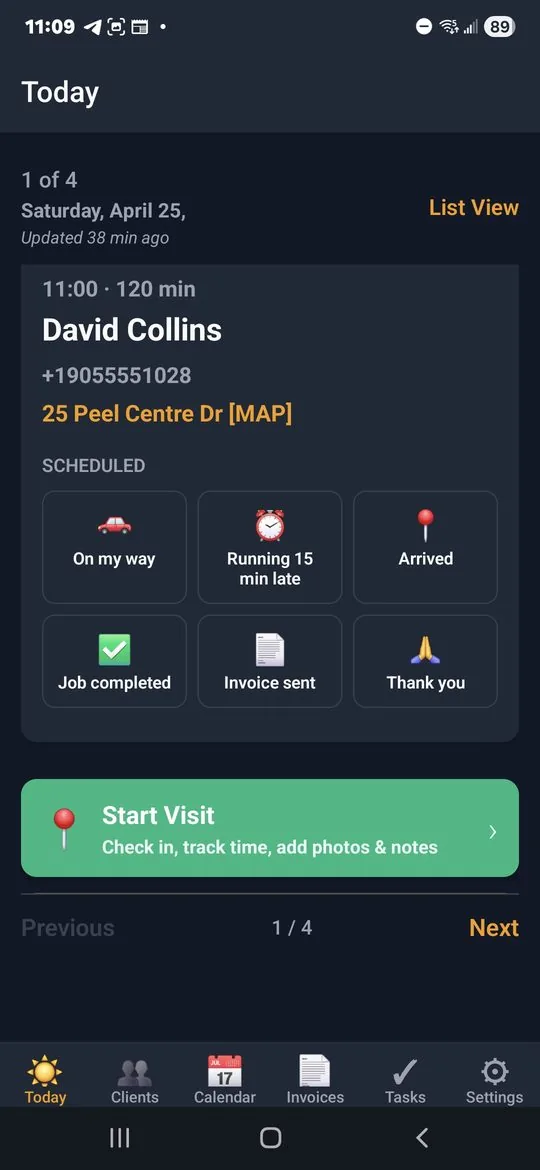
Your next visit is one tap from here — call, text, or open the address in Maps. And six pre-written status texts let your client know exactly where you are without you typing a word: On my way, Running 15 min late, Arrived, Job completed, Invoice sent, Thank you.
- Today screen always shows your next visit, paginated through the day's full route
- Six one-tap status texts — pre-written, in your client's language
- Address is a Maps link — one tap to navigate
- Big green Start Visit button kicks off check-in, time tracking, photos, and notes
Make it look like yours
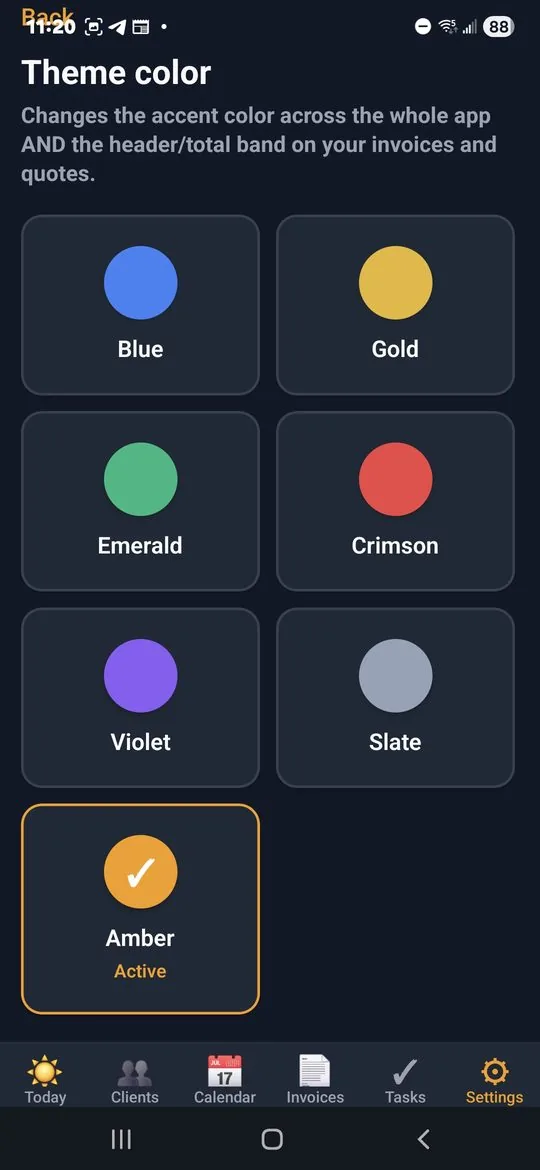
Seven accent colors. Light or dark. Pick the look that matches your brand — or just the one that's easiest on your eyes after a long day.
- Blue, Gold, Emerald, Crimson, Violet, Slate, Amber
- Light or dark mode, system-aware
- Accent flows into invoice headers and totals so PDFs match your app
Customize everything. Or nothing. Both fine.
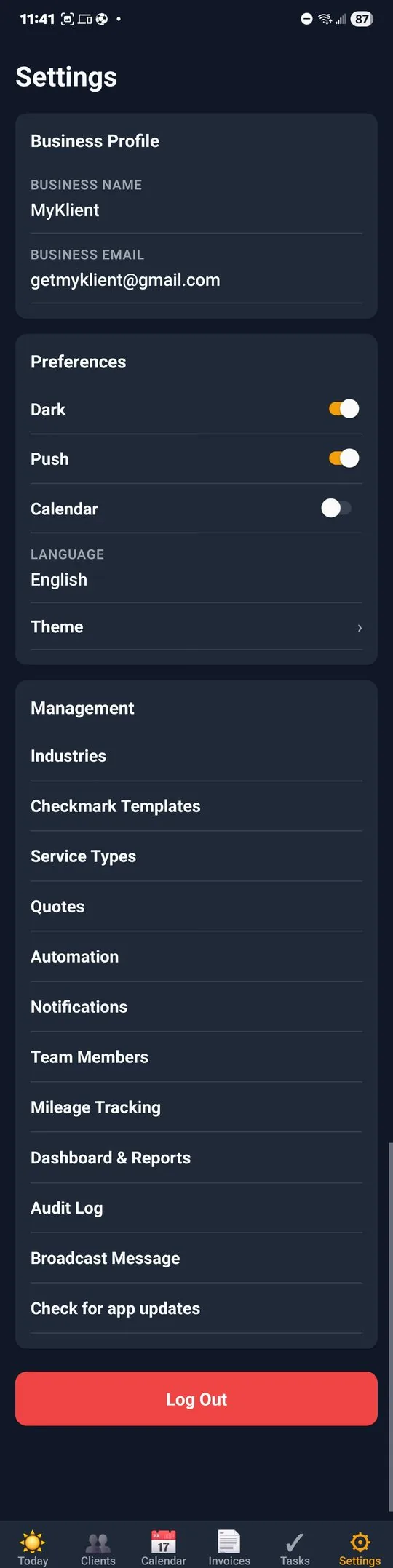
Yes, the settings page is long. That's because we put every knob you'll ever want where you can find it — checkmarks, services, automation rules, reminder windows, theme colors, mileage rate, team logins, the works. Touch zero of it and the app still runs. That's the deal.
- Day-one defaults work — no setup checklist to slog through
- Every option is plain English, grouped by what it does
- Lazy-mode and tinkerer-mode are equally supported
Customization that goes deep
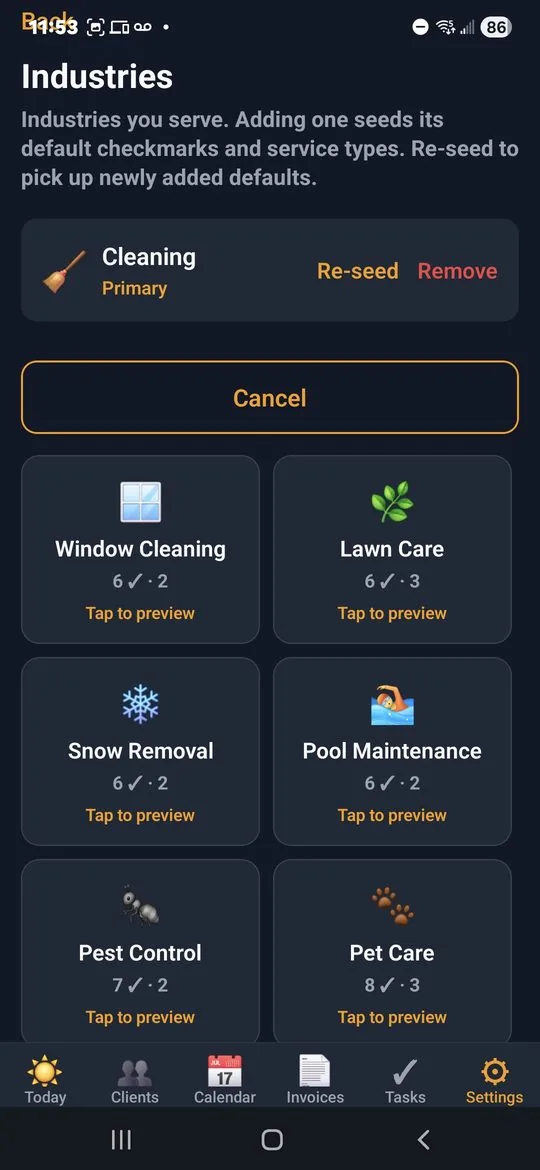
Looks are the easy part. Underneath, you reshape the app to match how you actually work — your services, your checkmarks, your message templates, your reminders.
- Build your own checkmark templates: VIP, Has Pets, Gate Code, Supplies Provided, anything
- Define service types with default price, duration, photo and signature requirements
- Write your own SMS automation rules with bilingual templates
- Notification reminders: 24h or 1h before, on or off per type
- Mileage rate, working hours, business profile, team members
And dozens of small things that add up
The features that don't need a whole section, but you'd miss if they weren't there.
From sign-up to paid in three steps
Add your clients
Pick your trade — we pre-load the right service types and checklist templates. Add clients with addresses, gate codes, and language preference.
Schedule your visits
Tap a date, pick a client, set the time. Set up recurring weekly or monthly visits in one shot. Reminders fire 24h and 1h before.
Done & paid
Mark the job complete, generate the invoice, send it from the app. When payment lands, the receipt sends itself.
Pick a plan. No ads, ever.
Annual billing saves about 27%. Cancel anytime.
- Up to 20 clients
- All features
- Invoice & receipt PDFs
- SMS automation
- Priority email support
- Unlimited clients
- Unlimited team members, each with their own login
- Audit log — see exactly who did what, when
- CSV exports (clients, invoices, visits, mileage)
- All Starter features
- Priority email support
No ads at any tier. The app stays clean and professional.
Common questions
Is my data safe?
Yes. Your data lives on encrypted storage with TLS in transit, and sensitive client fields like alarm codes are encrypted at rest. You own your data and can export it as CSV anytime.
Does it work without internet?
The app caches recent data locally so you can view clients, schedules, and notes offline. Editing and sending sync up the next time you have signal.
Can I import clients from a spreadsheet?
Yes — paste from a CSV with name, phone, email, address columns. Multi-language clients are tagged on import too.
Is there an iOS version?
Android first — iOS is in active development. Sign up to be notified when it's ready.
Can I cancel anytime?
Yes. No contracts. Cancel from your account settings; you keep access until the end of the current billing period and your data stays exportable.
What about ads?
None. Not at the Free tier, not at any tier. Your clients see a professional app, not someone else's promotion.
Do I have to buy SMS credits?
No. MyKlient prepares the message and hands it to your phone's own messaging app, so texts come from your real number and cost whatever your phone plan already charges. There are no per-message credits to top up.
Can I use MyKlient for more than one trade?
Yes. Pick a primary trade when you sign up and add others alongside it. The app ships pre-loaded for 18 trades, each with its own starter service types and visit checkmarks, and every one can be renamed to match how you actually work.
Can my crew have their own logins?
On the Pro plan, yes — unlimited team members, each with their own login, plus an audit log that shows who did what and when.
How much does a scheduling app like MyKlient cost?
The Free plan covers up to 5 clients with every feature included. Starter is $4.99/month (up to 20 clients) and Pro is $14.99/month (unlimited clients, team logins). Annual billing saves about 27%, and you can cancel anytime.
Useful whether or not you use the app
Free invoice templates
Blank, printable invoice templates for cleaning, pest control and landscaping — PDF and Word, no sign-up.
Jobber alternatives for solo operators
What the main field-service apps really cost for one person, with pricing read from each vendor's own page.
Guides and comparisons
Straight write-ups on pricing, seat limits and what small operators actually need.